
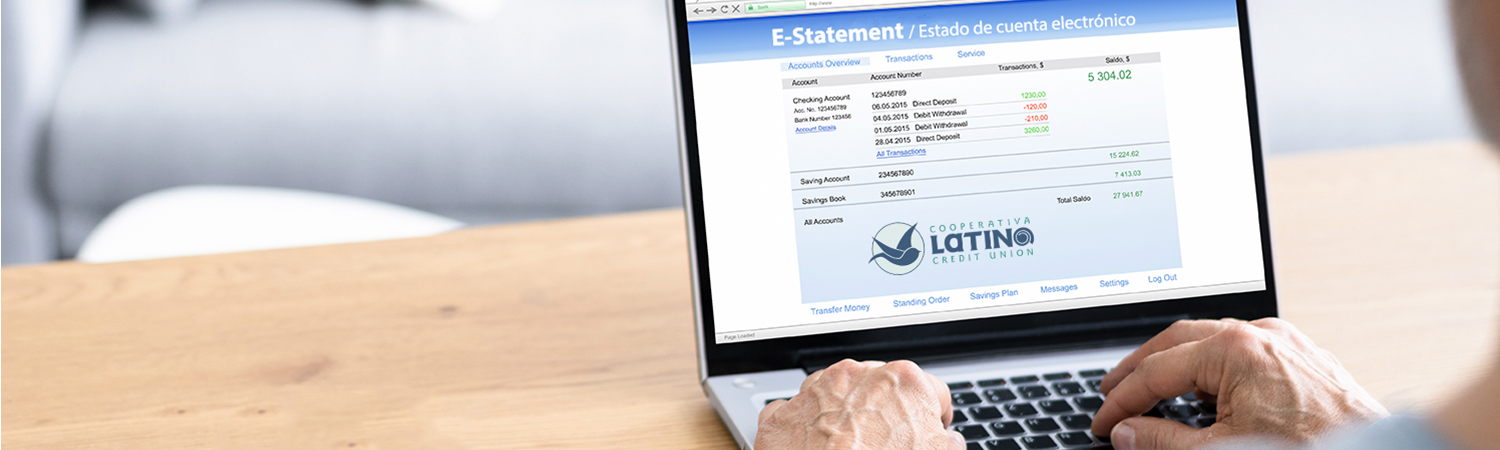
Beginning June 2025, a monthly fee of $3.50 will be charged to your account if you choose to receive paper statements. This fee will be automatically deducted from your account on every last day of each month while you are enrolled in paper statement delivery. To help you save and enjoy added convenience, LCCU offers free Electronic Statements through LatinoConnect online and the mobile app. Switching to E-Statements is easy and ensures quick, secure access to your account information anytime. Read below to learn how to sign up for E-Statements.
Manage your finances effectively. Our online statement feature provides you with quick and easy access to your account statements, allowing you to track your financial health anytime and anywhere.
*Note: Regular transaction and deposit accounts are included in a single statement, separate from mortgage and credit card statements. Each statement will display all accounts associated with your Member ID for easy review.
Enroll in E-Statements
- Log in to your LatinoConnect account online or mobile app.
- Once logged in, click on the Menu.
- From menu options, select More
- Scroll down to choose Documents and Statements.
- Next, select Paperless Settings.
- Check off the Statements and Tax Forms box .
- Click Save to finalize your enrollment to Electronic statements.
View Your Statements Online
With just a few clicks, you can view your monthly account statements online or directly through our mobile app.
*Note: Monthly statements are available at the start of the following month. e.g. October’s statement will appear in your account at the beginning of November.
- Log in to LatinoConnect online or mobile app.
- Once logged in, click on the Menu.
- From menu, select More
- Scroll down to choose Documents and Statements.
- Next, select eStatements and Documents.
- Under the statements tab, choose the monthly statement you would like to view.
- Once you’ve selected a statement, you’ll have the option to view it on your device or download and print the document for your records.
Spanish Statements
Members who prefer to receive their statements in Spanish can easily make the switch! Simply call our Member Service Center at (919) 595-1800 or send us a secure message through LatinoConnect requesting your statements in Spanish.
*Note: Merchant names will not be translated and will appear as they are provided by the merchant.
- To send us a secure message, Log in to LatinoConnect online or mobile app.
- Once logged in, tap on Menu.
- Click on Message Center or the envelope icon.
- Select Create a New Message.
- Fill in the Subject as Spanish Statements, select statements under topic and type your request on the message box.
- Click Send. You will be notified once a representative has made the switch on your account.
What is in Your Statements
Understanding your financial statements is crucial for effective money management. Review the following details to help you understand your finances and make informed decisions.
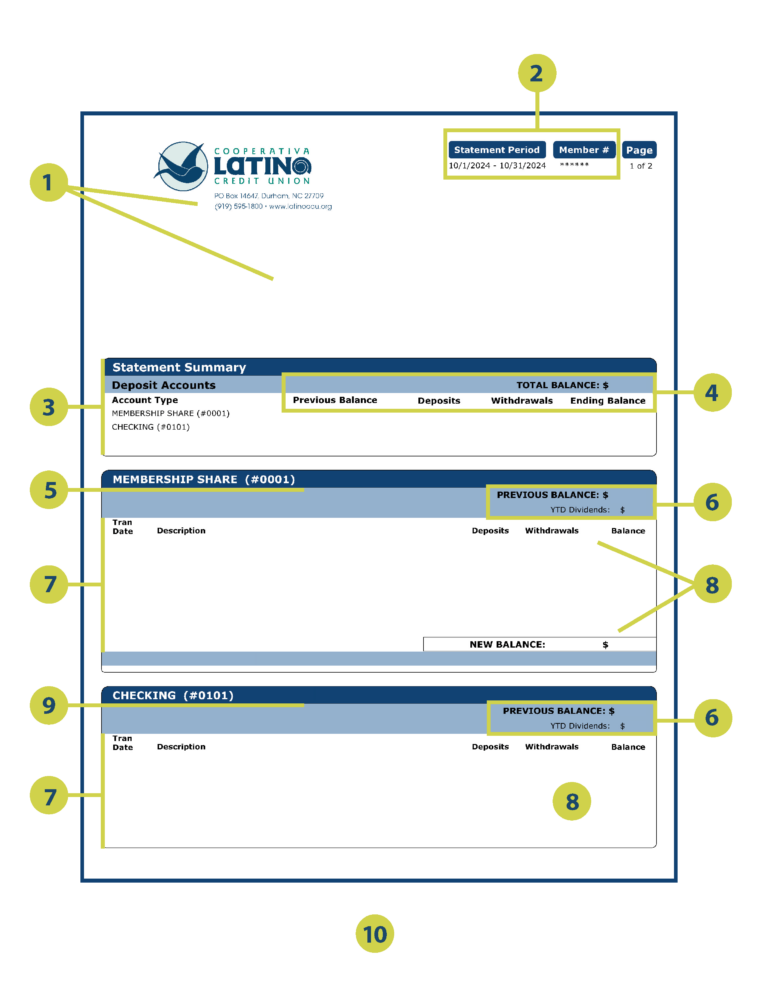
- In the top left corner of your statement, you’ll find our logo along with our main address, as well as your name and mailing address as listed on your account.
- The top right corner displays the statement period, indicating the date range covered (e.g., 10/1/2024 – 10/31/2024) and partially shows your unique member number.
- The Statement Summary provides an overview of your different account types, giving you a snapshot of all your deposit accounts.
- Total Balance represents the cumulative balance of all your deposit accounts. Previous Balance is your balance at the beginning of the statement period, while Deposits shows the total amount deposited during that time. Withdrawals reflect the total amount taken out, and Ending Balance is what remains at the end of the period.
- The Membership Share section details your shares account number and lists all activity related to your primary savings account.
- Previous Balance refers to the balance at the start of the statement period, and YTD Dividendsindicates the total dividends earned on the account year-to-date.
- Transaction Date marks when each transaction took place, formatted as month/day (e.g., 10/17). Description provides a brief explanation of each transaction, such as Deposit or ATM Withdrawal.
- Deposits represent the amounts added to your account, while Withdrawals signify the amounts taken out. Balance indicates the running total after each transaction, and New Balance is the final balance for the statement period.
- The Checking section lists your checking account number and tracks all activity related to your checking account.
- Draft Reconciliation is a form provided to help you balance your draft account efficiently.
Stay informed about your home loan with our clear and detailed mortgage statements. Track your payments, interest, and remaining balance, all in one easy-to-read document.
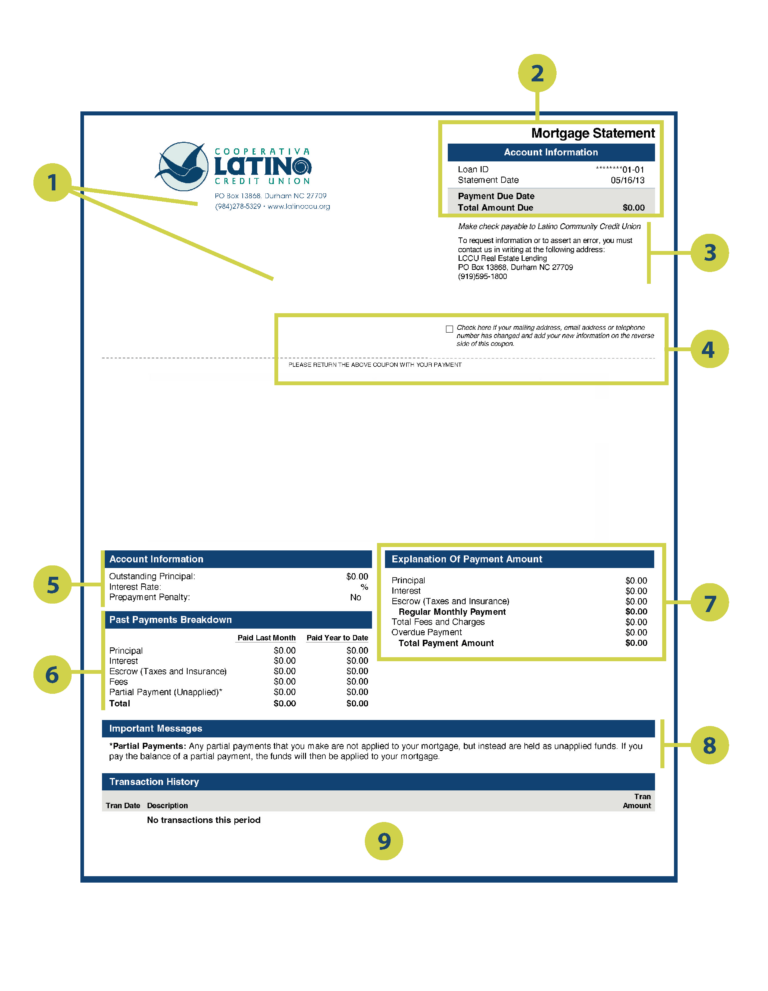
- In the top left corner of your statement, you will see our logo along with our main address, as well as your name and mailing address as it appears on your account.
- The top right section of your statement contains important Account Information, including your Loan ID, which is your unique mortgage loan number. You’ll also find the Statement Date, indicating when the statement was generated, the Payment Due Date, which is the deadline for your next payment, and the Total Amount Due, reflecting the total payment required, including any outstanding amounts or fees.
- Below your account information, there is a note reminding you to make checks payable to Latino Community Credit Union. If you also need to request information or report an error, please contact us in writing at: LCCU Real Estate Lending (PO Box 13868, Durham, NC 27709).
- You will find a checkbox labeled “Check here if your mailing address, email address, or telephone number has changed.” If you select this, please write your updated information on the reverse side of the coupon and return it with your payment.
- The Account Information section at the bottom provides critical details about your loan, such as the Outstanding Principal, which is the remaining balance on your mortgage, the Interest Rate, your loan’s current interest rate, and the Prepayment Penalty, which denotes any applicable penalties for prepayments.
- The Past Payments Breakdown section summarizes your payments applied Last Month and those Paid Year-to-Date. It breaks down total payments made this year into categories: Principal, Interest, Escrow (for Taxes and Insurance), Fees, and Partial Payment (Unapplied), culminating in the Total, which is the sum of all payments made.
- To the right, you’ll find an Explanation of Payment Amount This clarifies how your payments are allocated across different components: Principal (amount applied to your loan balance), Interest (amount applied to loan interest), Escrow (set aside for taxes and insurance), Regular Monthly Payment (the total of the above), Total Fees and Charges (any additional charges), Overdue Payment (amounts that are past due), and the Total Payment Amount, which is what you owe in total.
- The Important Messages section may include vital updates, reminders, or additional key information about your mortgage account. For instance, there may be a note regarding **Partial Payments**, stating that any partial payments made are not applied to your mortgage but are held as unapplied funds. Once the balance of a partial payment is settled, the funds will be applied to your mortgage.
- The final section, Transaction History, lists all transactions processed during the statement period. It includes the Transaction Date (when the transaction took place), a Description that gives a brief note about the transaction (such as “Monthly Payment”), and the Transaction Amount, which refers to the amount applied.
Manage your spending and stay on top of your finances with our comprehensive credit card statements. Review your transactions, payments, interest charges, and available credit at a glance.
*Note: Credit Card Statements must be enrolled in electronic statements to view online.
*Note: All Credit Card payments must be sent to: LATINO COMMUNITY CREDIT UNION – PO BOX 71050, Charlotte, NC 28272-1050
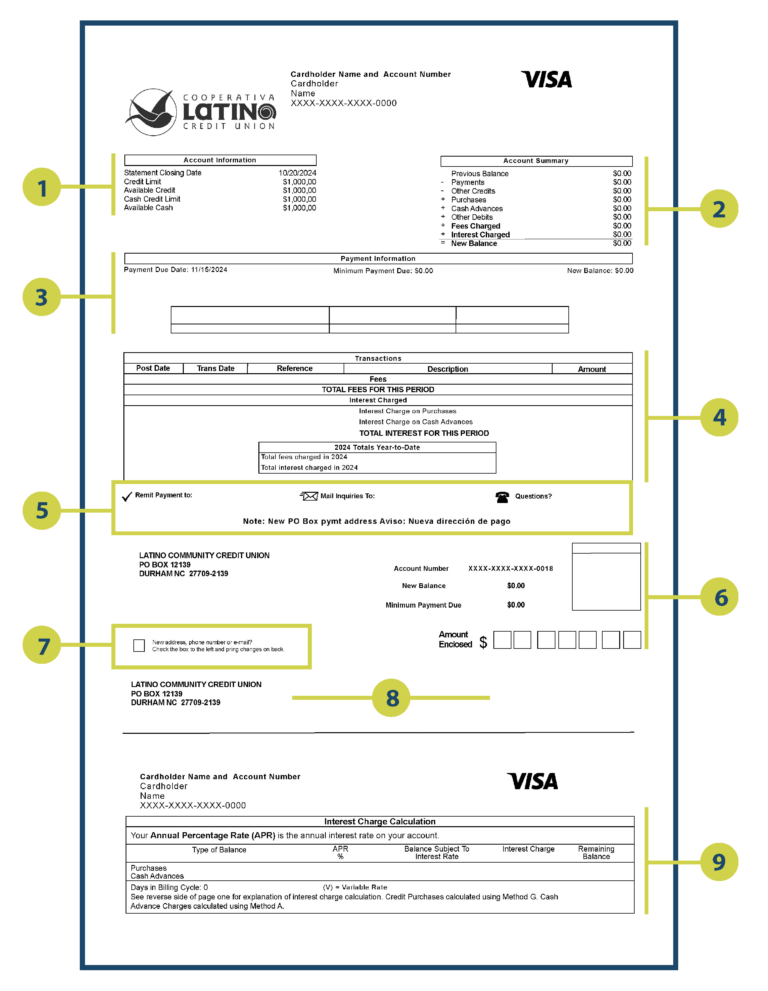
- Account Information offers essential details about your account, including the Statement Closing Date, which marks the last day of the billing cycle; your total credit limit; the remaining credit available for use; the maximum amount available for cash advances; and the remaining cash advance limit.
- Account Summary displays your activity during the statement period, showing the balance carried over from the previous statement; the total amount of payments received; any refunds or credits applied; total purchases made during the period; total cash advances taken; any other transactions (such as returned payments); total fees applied (e.g., late fees); total interest accrued; and the New Balance, which is the current amount owed.
- Payment Information outlines your payment responsibilities, including the deadline for making your payment, the minimum amount required to avoid late fees, and the full balance owed. Note: A Late Payment Warning states that if we do not receive your minimum payment by the specified date, a late fee may apply. A Minimum Payment Warning indicates that paying only the minimum will result in additional interest charges and a longer repayment period.
- Transactions Section provides a detailed list of your account activity, including the date the transaction was posted to your account, the date the transaction occurred, the transaction reference number, a brief description of the transaction (e.g., “Online Purchase”), and the transaction amount. This section also summarizes all fees charged during the billing cycle and the interest accrued for the period.
- Payment Instructions offer guidance on making payments, including the mailing address for sending payments (LATINO COMMUNITY CREDIT UNION – PO BOX 71050, Charlotte, NC 28272-1050), the address for written inquiries or concerns, and customer service contact numbers for assistance.
- Payment Slip, the detachable payment coupon includes pre-filled information such as LCCU’s mailing address, your account number, and the new balance. Simply fill in the payment amount you are sending next to Amount Enclosed. Note: Use the enclosed envelope to return the slip and payment to ensure it is received by 5:00 PM on the due date.
- If your contact information has changed, please check the box and print the updated details on the back of the coupon.
- Verify LCCU’s mailing address located on the left and your address located on the right.
- The Interest Charge Calculation (usually found on Page 2) explains how interest is calculated. Balances are categorized by purchases or cash advances and include the interest rate applicable to the balance, the amount used to calculate interest, the total interest accrued during the period, and the balance after applying payments and charges.